
How to Set Up Solitaire: Step-by-Step Card Layout Guide

Setting up Solitaire with a real deck is simple once you learn the pattern. This guide explains the exact layout used in Classic Klondike Solitaire, including the number of piles, the card arrangement, and key tips for beginners. If you'd prefer to skip the physical setup, you can always play instantly at Solitaire.com, no shuffling or table space needed.
Solitaire has been played for generations as a quiet, single-player card game. Many people learn it from family members or discover it later as a relaxing pastime. While the rules are straightforward, the setup must follow a specific order for the game to work properly.
A correct setup ensures that every card has a purpose and that the game flows as intended.
What You Need to Set Up Solitaire
To play a traditional game of Solitaire with cards, gather the following:
- One standard 52-card deck (remove Jokers)
- A flat playing surface, like a kitchen table
- Enough space to place seven columns of cards
- Optional: a clear area for Stock, Waste, and Foundation piles
Many players also keep a printed diagram nearby when learning for the first time. If that sounds helpful, you can sketch out the layout on paper to follow along.
A full table or desk works best because the layout spreads horizontally. Each of the seven Tableau columns grows wider as cards are revealed. Leaving enough room prevents piles from overlapping, which makes it easier to see your options during play. Good lighting also helps, especially when distinguishing red and black suits.
Some players like to organize the space before dealing any cards. For example, you may decide where the Foundation piles will go before starting. Planning the layout ahead of time reduces confusion later, especially during the first few games.
How to Set Up Classic Klondike Solitaire
The setup for Classic Solitaire follows a fixed pattern. Learning how to deal solitaire correctly is essential, each column on the Tableau increases by one card from left to right, and only the top card in each column is face-up.
Step 1: Shuffle the deck
Shuffle all 52 cards thoroughly. This keeps the game fair and unpredictable.
A proper shuffle matters because Solitaire relies on both skill and luck. A well-mixed deck prevents patterns from forming and gives every card an equal chance to appear. You may shuffle several times if needed, especially when using a new deck.
Step 2: Deal the Tableau
Start on the left and move right:
- Column 1: 1 face-up card
- Column 2: 1 face-down card, then 1 face-up
- Column 3: 2 face-down cards, then 1 face-up
- Column 4: 3 face-down cards, then 1 face-up
- Column 5: 4 face-down cards, then 1 face-up
- Column 6: 5 face-down cards, then 1 face-up
- Column 7: 6 face-down cards, then 1 face-up
Each column forms part of the Tableau, where most gameplay takes place.
The Tableau creates the main structure of the game. The face-down cards add mystery, while the face-up cards give you starting options. Revealing face-down cards later is one of the main goals during play, since each reveal opens new possibilities.
Step 3: Create the Stockpile
Place the remaining cards face-down in a single stack. This is called the Stockpile. You'll draw from it during the game.
The Stockpile acts as your reserve. When no moves are available on the Tableau, drawing from the Stock gives you new cards to work with. Keeping the Stock neatly stacked helps avoid mistakes during drawing.
Step 4: Leave space for the Waste pile
Next to the Stock, leave room for the Waste pile, where cards from the Stock are placed during play.
Cards in the Waste pile may be reused depending on the game rules. In Turn 1 games, each card is easier to access. In Turn 3 games, only the top card is playable, which affects strategy.
Step 5: Leave space for 4 Foundation piles
Above the Tableau or to the side, leave room for four Foundation piles. Each pile will be built up by suit from Ace to King during the game.
The Foundation piles represent progress. Every card placed there brings you closer to finishing the game. Keeping these piles clearly visible helps you track which suits are advancing.

Common Setup Mistakes to Avoid
Even experienced players sometimes make setup mistakes. Here are common errors to watch for:
- Flipping all Tableau cards face-up during setup (only the top card should be visible)
- Using Jokers in the deck (they're not used in Solitaire)
- Miscounting the cards in each Tableau column
- Forgetting to leave space for the Foundation or Waste pile
- Placing cards on the Foundation too early (only Aces can start a pile)
Taking a moment to double-check the layout before starting helps prevent frustration later. A correct setup saves time and keeps the game fair.
Turn 1 vs Turn 3 Differences
Some Solitaire games use Turn 1 or Turn 3 rules. This changes how cards are drawn from the Stockpile:
- Turn 1: Draw one card at a time from the Stock
- Turn 3: Draw three cards at a time, but only play the top one
Turn 1 is simpler and recommended for beginners. Turn 3 adds more difficulty and planning. Solitaire.com allows you to choose between both versions if you'd like to compare them.
Turn 1 gives players more control and visibility. Every card drawn becomes immediately available. Turn 3 requires planning ahead, since cards can become buried beneath others in the Waste pile. Both versions use the same initial layout, so the setup steps stay the same.
The Solitaire Tableau
Understanding the layout terms helps you learn how to set up solitaire with cards more effectively. Here's what each part of the solitaire set up means:
Tableau: Seven columns of cards, where most moves happen. Cards are arranged in descending order with alternating colors (red on black, black on red).
Foundation: Four piles built by suit from Ace to King. This is your goal-complete all four Foundation piles to win.
Stockpile: The face-down stack of leftover cards after dealing the Tableau. You draw from this pile when no moves are available.
Waste pile: Cards drawn from the Stockpile. These cards can be played onto the Tableau or Foundation.
Example: You may place a black Q ♣ on a red K ♦️ in the Tableau, since Solitaire rules require alternating colors and descending order.
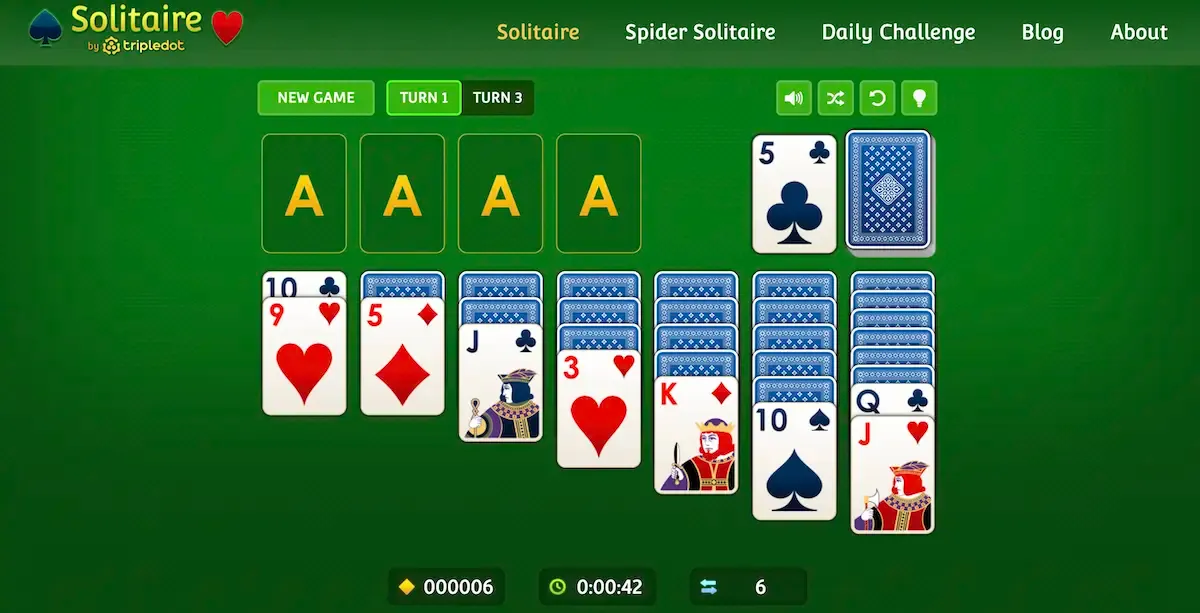
Learning these terms helps when reading rules or strategy tips. Many Solitaire guides and digital versions use this same language. Knowing the names of each area also makes it easier to understand why certain moves are allowed while others are not. For a complete list of card game terminology, visit our Solitaire glossary.
How to Set Up Spider Solitaire
Spider Solitaire is more advanced and uses two full decks (104 cards). The setup is different from Klondike:
- Create 10 Tableau columns
- First four columns: 6 cards each
- Remaining six columns: 5 cards each
- Only the top card in each column is face-up
- The remaining cards become the Stockpile
Spider Solitaire focuses more on planning than luck. Beginners may want to start with Klondike before trying Spider.
Spider Solitaire also requires completing full sequences from King down to Ace within the Tableau. Completed sequences are removed from play. Because of the added complexity, many players prefer practicing Spider digitally before attempting it with physical cards.
Play Solitaire Without the Setup
If you'd rather jump straight into a game, Solitaire.com lets you play Classic Solitaire for free, with no setup needed. The game arranges the cards instantly and includes:
- Undo button to try different moves
- Hint system to suggest your next action
- Classic scoring (not Vegas-style)
- Customizable card designs and themes
- Daily Challenges for a new puzzle every day
Solitaire.com works on computers, tablets, and mobile phones. It offers a smooth experience that mirrors the traditional layout while removing the need for shuffling or dealing.
Solitaire Setup Questions Answered
How many piles are in Solitaire?
There are seven piles in the Tableau, plus space for four Foundation piles, one Stockpile, and one Waste pile.
What is the correct card layout in Solitaire?
The layout includes seven columns. The first has one card, the second has two, and so on. Only the top card in each pile is face-up.
How do you set up Solitaire with a real deck?
Use a 52-card deck. Deal seven columns as described, set aside the rest as the Stock, and leave space for Foundations and a Waste pile.
What happens to leftover cards after setup?
All leftover cards form the Stockpile. You draw from it during the game.
What is the difference between Foundation and Tableau?
The Tableau is where most gameplay takes place. The Foundation piles are where you aim to build each suit from Ace to King.
Do you need Jokers for Solitaire?
No, remove all Jokers before setting up. Solitaire uses only 52 cards.
Is Turn 3 Solitaire harder than Turn 1?
Yes. Turn 3 makes it more difficult to access cards because you can only play the top of every three.
Can you play Solitaire without physical cards?
Yes. Solitaire.com sets up everything automatically and lets you play for free online.